> For the complete documentation index, see [llms.txt](https://docs.frontrun.pro/llms.txt). Markdown versions of documentation pages are available by appending `.md` to page URLs; this page is available as [Markdown](https://docs.frontrun.pro/trading/trading-basics/tp-sl-tsl-dev-sell-migration-sell.md).
# TP / SL / TSL / Dev Sell / Migration Sell
Automate entries and exits using price-based strategies directly from the Instant Trade panel.
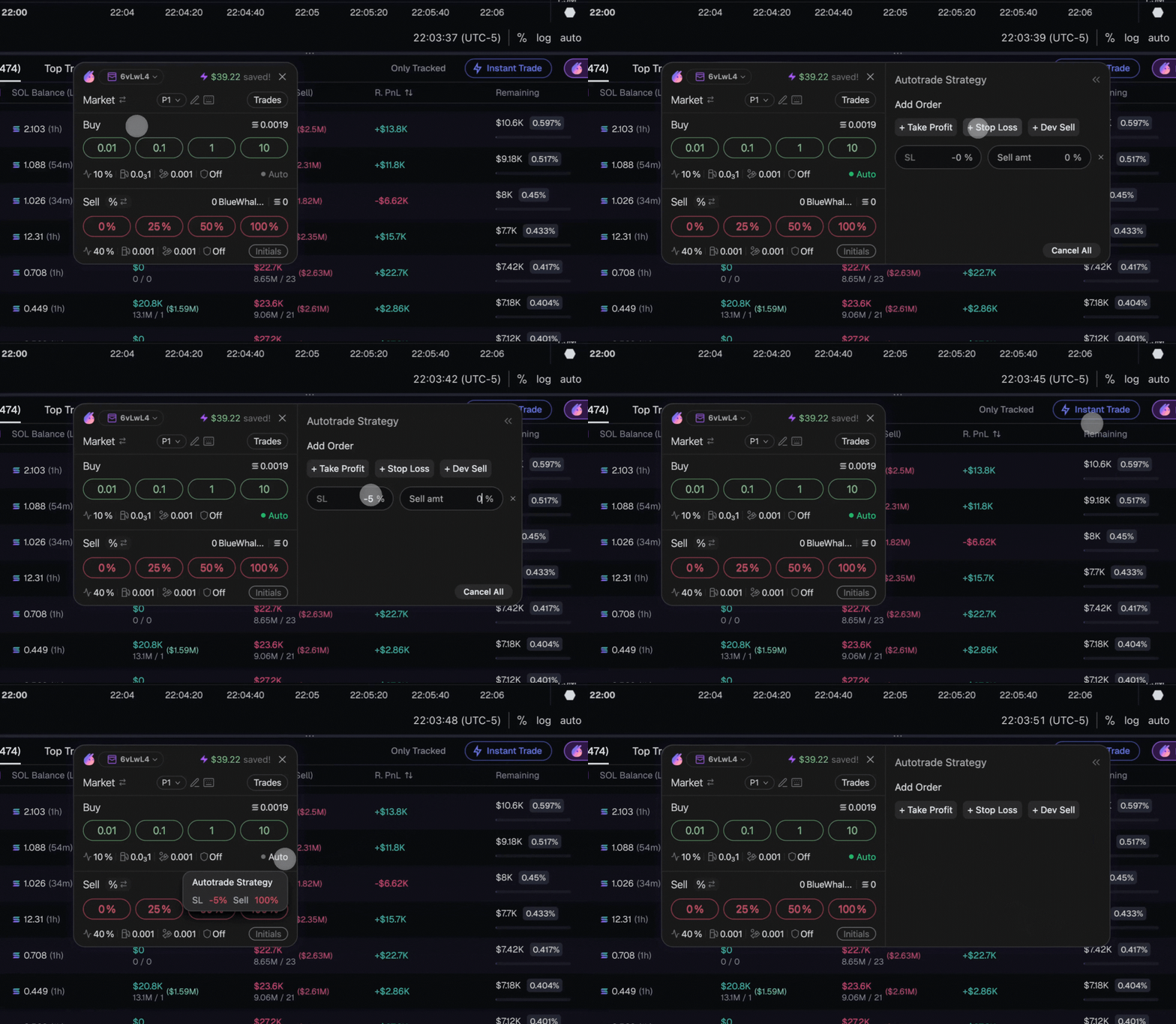
## Enabling Autotrade
Autotrade is controlled from the Instant Trade panel.
* When Auto is enabled (green indicator), the Autotrade Strategy panel becomes available.
* Autotrade applies only to the current trade unless modified again.
Once enabled, you can add one or more strategies before executing the trade.
## Supported Strategies
Autotrade currently supports:
{% tabs %}
{% tab title="Take Profit (TP)" %}
Automatically sell a portion or all of a position at predefined upside targets.
{% endtab %}
{% tab title="Stop Loss (SL)" %}
Automatically exit a position when price moves against you.
{% endtab %}
{% tab title="Trailing Stop Loss" %}
Automatically trail a position's exit price as it moves in your favor, locking in gains without a fixed target.
{% endtab %}
{% tab title="Dev Sell" %}
Automatically exit based on detected developer sell activity.
{% endtab %}
{% tab title="Migration Sell" %}
Sell automatically when a token migrates from bonding curve to DEX.
{% endtab %}
{% endtabs %}
{% hint style="success" %}
Autotrade orders appear under **Active Positions**, with live status and fills in one place.
{% endhint %}
## How Execution Works
Strategies are attached at execution time via the Instant Trade panel
* Orders are monitored continuously after the trade settles
* When conditions are met, Frontrun executes the transaction automatically
* All executions use your active trading settings (fees, slippage, MEV mode)
* Failed or cancelled executions do not affect the underlying position
---
# Agent Instructions
This documentation is published with GitBook. GitBook is the documentation platform designed so that both humans and AI agents can read, navigate, and reason over technical content effectively. Learn more at gitbook.com.
## Querying This Documentation
If you need additional information that is not directly available in this page, you can query the documentation dynamically by asking a question.
Perform an HTTP GET request on the current page URL with the `ask` query parameter, and the optional `goal` query parameter:
```
GET https://docs.frontrun.pro/trading/trading-basics/tp-sl-tsl-dev-sell-migration-sell.md?ask=&goal=
```
`ask` is the immediate question: it should be specific, self-contained, and written in natural language.
`goal` is optional and describes the broader end goal you are ultimately trying to accomplish on behalf of the user. GitBook uses it to tailor the answer towards what is most useful for that goal.
The response will contain a direct answer to the question and relevant excerpts and sources from the documentation.
Use this mechanism when the answer is not explicitly present in the current page, you need clarification or additional context, or you want to retrieve related documentation sections.


.gif?alt=media&token=9c42bf48-5d0c-4e33-9552-db68980e23be)